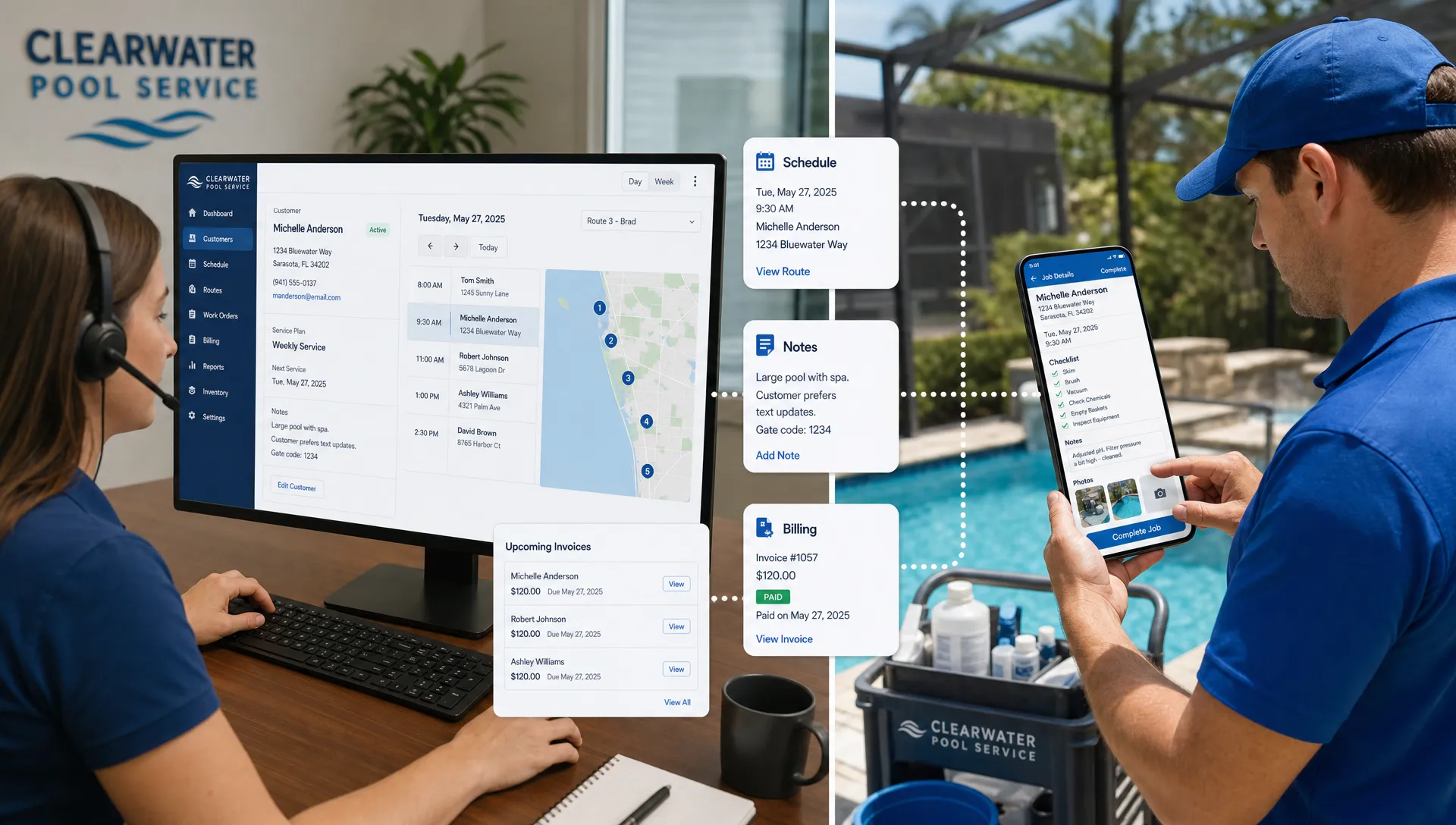
Scaling a service business is rarely limited by demand alone. Many companies can generate leads, win repeat customers, and hire technicians, yet still struggle to grow because the daily operation depends on scattered notes, owner memory, paper checklists, and manual follow-up.
That is where CRM software becomes more than a contact database. For service businesses, the right CRM connects customer history, scheduling, field work, communication, billing, and performance tracking into one operating system. Instead of simply storing names and phone numbers, it helps the business repeat what works, catch problems earlier, and serve more customers without adding chaos.
For pool service companies, HVAC contractors, landscapers, cleaners, pest control teams, and other recurring-service businesses, growth depends on consistency. Customers expect fast responses, accurate appointment windows, clean handoffs, proof of work, and easy payment. A CRM gives your team the structure to deliver that experience at a larger scale.
Why service businesses hit a growth ceiling
A service business can feel manageable when the owner knows every customer, every technician, and every open job. But growth changes the math. More customers means more properties, more route changes, more special instructions, more invoices, more callbacks, and more opportunities for details to slip.
Common bottlenecks include:
- Customer details scattered across texts, spreadsheets, notebooks, and memory
- Leads going cold because follow-up is inconsistent
- Dispatchers spending too much time rebuilding routes manually
- Technicians missing key property notes or equipment history
- Office staff chasing paperwork before invoices can be sent
- Managers lacking visibility into technician performance and job quality
These are not just administrative annoyances. They limit revenue. If your team cannot confidently handle more jobs, your marketing and hiring efforts will eventually create operational strain instead of profitable growth.
The U.S. Small Business Administration emphasizes that business growth requires planning, reliable processes, and the ability to manage increased demand. CRM software supports that shift by turning informal habits into systems your whole team can follow.
What CRM software does for a service business
CRM stands for customer relationship management. In a traditional sales environment, CRM software tracks leads, contacts, deals, and communication. In a service business, CRM needs to go further. It has to connect the customer relationship to the work being performed in the field.
A service-focused CRM typically helps teams manage:
- Customer and property records
- Lead intake and follow-up
- Job history and recurring service schedules
- Technician notes, photos, and checklists
- Equipment or asset details
- Customer communication
- Invoices, payments, and account status
- Reporting on team activity and service outcomes
For pool service companies, that customer record may need to include water-quality logs, equipment details, gate codes, visit history, and before-and-after photos. A generic contact database may not be enough. A purpose-built option like pool service CRM software from SplashIQ is designed around the information pool teams actually need to run daily operations.
The biggest ways CRM software helps service businesses scale faster
CRM software does not create scale by itself. It creates the conditions for scale: cleaner data, repeatable workflows, faster handoffs, better accountability, and a more professional customer experience.
| Growth bottleneck | How CRM software helps | Scaling impact |
|---|---|---|
| Details live in too many places | Centralizes customer, property, and job information | Fewer mistakes as volume increases |
| Leads are followed up manually | Tracks opportunities and next steps | More booked work from the same lead flow |
| Scheduling depends on one person | Organizes routes, recurring visits, and job status | Easier dispatch as the team grows |
| Field work is inconsistent | Standardizes notes, checklists, photos, and logs | Better quality control across technicians |
| Billing is delayed | Connects completed work to invoices and payments | Improved cash flow and less admin time |
| Managers lack visibility | Provides activity and performance data | Smarter hiring, coaching, and planning |
1. It creates one source of truth for every customer
When a business is small, informal communication can work. The owner remembers that Mrs. Alvarez has a locked side gate, that one property has an older pump, and that a customer prefers text messages instead of phone calls. But as soon as more team members are involved, that knowledge needs to live somewhere reliable.
CRM software gives every authorized team member access to the same customer record. That record can include contact details, service address, property notes, past visits, open issues, equipment information, communication history, and billing status.
This matters because scaling requires delegation. Owners and managers cannot personally brief every technician before every job. A centralized CRM lets the business hand off work without losing context.
For the customer, this creates a smoother experience. They do not have to repeat the same information every time they call. They are less likely to receive conflicting answers. They feel like the business knows them, even as the company gets bigger.
2. It turns more leads into booked work
Many service businesses do not have a lead problem. They have a follow-up problem. A prospective customer calls while the office is busy, submits a form after hours, or asks for a quote during peak season. If that request is not logged, assigned, and followed up, it can disappear.
CRM software helps service teams track every lead from first contact to booked job. It can make the sales process visible, so managers can see which opportunities are new, which need follow-up, which are waiting on estimates, and which were lost.
Even simple visibility can improve conversion. If your team can see that a lead has not received a response, or that an estimate was sent but never followed up, the next action becomes clear. Over time, the business can identify where revenue is leaking and tighten the process.
This is especially important for seasonal service businesses. Pool service companies, for example, may receive a surge of openings, repairs, cleanups, and new maintenance requests during peak months. Without a CRM, the busiest season can become the easiest time to lose high-value opportunities.
3. It makes scheduling and routing easier to scale
Scheduling is one of the first operational systems to break during growth. A single dispatcher may be able to manage a few routes manually, but complexity rises quickly when you add recurring visits, emergency calls, technician availability, geography, weather interruptions, and customer preferences.
CRM software helps by connecting customer records to scheduled work. Instead of rebuilding each day from scratch, the team can see where customers are, what service is due, who is assigned, and what still needs attention.
For field service businesses, this has several benefits:
- More efficient routing and fewer unnecessary drive times
- Better visibility into open, completed, and missed jobs
- Faster rescheduling when a technician is out or a route changes
- Cleaner handoffs between office staff and field teams
- Less reliance on one dispatcher’s memory
Scaling faster does not always mean hiring more people immediately. Often, it means using the team you already have more efficiently. Better scheduling can increase capacity without sacrificing service quality.
4. It standardizes field work across every technician
A service company’s reputation is built in the field. Customers judge the business by whether the technician arrives on time, does the work correctly, communicates clearly, and leaves the property in good condition.
As more technicians join the team, consistency becomes harder. Each person may have a different way of taking notes, documenting issues, or confirming completed work. Without a standard process, managers have to rely on trust, callbacks, and customer complaints to understand what happened.
CRM software helps standardize field operations. Depending on the system, technicians can access job details, log service notes, upload photos, record measurements, document equipment, and mark work complete from the field. For pool service companies, water-quality logs and equipment tracking are especially important because they create a record of what was found, what was adjusted, and what may need future attention.

This documentation protects the business and improves the customer experience. If a homeowner asks what was done, the office has an answer. If a technician notices a recurring issue, the history is available. If a manager wants to coach a new hire, there is actual work data to review.
Standardization is one of the hidden engines of scale. It makes training easier, reduces quality variance, and helps the business grow without becoming dependent on a few senior employees.
5. It improves customer communication
Fast, clear communication is one of the easiest ways for a service business to stand out. It is also one of the hardest things to maintain as the customer base grows.
Customers want to know when someone is coming, what was completed, whether there is a problem, and how they can pay. If they have to call repeatedly for updates, confidence drops. If the office cannot answer because field notes are missing, the entire business looks disorganized.
CRM software keeps communication tied to the customer record. Office staff can see previous conversations, service history, account details, and unresolved issues before responding. Field teams can document work in a way that supports better follow-up.
For recurring-service companies, this can improve retention. Customers are more likely to stay when they feel informed and when the business is easy to work with. A CRM helps make that communication repeatable instead of dependent on heroic effort from office staff.
6. It shortens the path from completed work to paid invoice
Revenue is not truly captured when the job is completed. It is captured when the business gets paid. Many service companies lose time and cash flow because paperwork, photos, job notes, approvals, and invoices move through separate systems.
A CRM can reduce that friction by connecting the operational record to the billing process. When work is completed, the office can see what happened and move faster on invoicing. If online payments are available, customers have a simpler path to pay.
This matters more as volume increases. Ten delayed invoices may be manageable. Hundreds of delayed invoices create cash-flow pressure, more collection work, and less confidence in financial reporting.
For service businesses with larger repairs or upgrades, financing options can also help remove buying friction for homeowners. The key is not just offering payment methods, but making payment part of a connected workflow from customer record to completed job.
7. It gives managers better visibility into performance
You cannot scale what you cannot see. In many service businesses, managers rely on gut feel to understand who is productive, which routes are profitable, where callbacks happen, or how quickly leads are handled.
CRM software helps turn daily activity into usable management information. Instead of asking around for updates, leaders can review job status, customer history, technician activity, open follow-ups, and service outcomes.
This visibility supports better decisions in several areas:
- Hiring, because managers can see where capacity is actually constrained
- Training, because technician scorecards and service records can reveal coaching opportunities
- Customer retention, because unresolved issues are easier to spot
- Route planning, because workload and geography are clearer
- Sales, because lead response and conversion are trackable
The goal is not to micromanage. The goal is to remove guesswork. When managers have reliable data, they can support the team sooner and make growth decisions with more confidence.
What to look for in CRM software for a service business
Not every CRM is built for field service. A sales CRM may be excellent for tracking deals but weak at managing routes, recurring visits, technician notes, property details, or job documentation. Before choosing a platform, service businesses should evaluate whether it matches their actual workflow.
| CRM capability | Why it matters for scaling |
|---|---|
| Customer and property profiles | Keeps service context available to office and field teams |
| Lead tracking | Prevents missed opportunities and improves follow-up discipline |
| Scheduling and routing | Helps teams handle more jobs without operational confusion |
| Mobile or field access | Gives technicians the information they need on-site |
| Offline functionality | Supports field teams when connectivity is unreliable |
| Photos and service documentation | Creates proof of work and supports better communication |
| Equipment or asset tracking | Helps teams service properties with complex systems |
| Online payments | Reduces payment friction and speeds up cash collection |
| Reporting and scorecards | Gives managers visibility into performance and quality |
The best CRM is not always the one with the longest feature list. It is the one your team will actually use. For service companies, that usually means the system must be simple enough for technicians, detailed enough for office staff, and structured enough for managers.
How to roll out CRM software without slowing the business down
A CRM implementation should simplify operations, not create months of disruption. The most successful rollouts start with the workflows that create the most immediate pain.
Begin by identifying where growth is currently breaking down. Is the team losing leads? Are routes inefficient? Are invoices delayed? Are technicians missing property notes? Are managers unsure who is performing well? Choose the first CRM workflows around those bottlenecks.
Then clean up your core data before importing or building records. Customer names, service addresses, contact preferences, property notes, equipment details, and recurring schedules need to be accurate enough for the team to trust. A CRM only becomes valuable when people believe the information inside it.
Training should be role-specific. Technicians do not need the same onboarding as office admins or managers. Field teams should learn how to access job details, add notes, upload photos, and mark work complete. Office teams should learn lead follow-up, scheduling, customer communication, and billing workflows. Managers should focus on reporting, accountability, and process improvement.
A practical rollout plan might look like this:
- Start with customer records: Centralize customer, property, and contact information so everyone works from the same source of truth.
- Add scheduling and field workflows: Move daily routes, job status, notes, and photos into the CRM so field activity becomes visible.
- Connect billing and payments: Reduce the lag between completed work, invoice creation, and customer payment.
- Review performance weekly: Use the CRM to spot missed follow-ups, route issues, technician coaching needs, and customer service problems.
- Refine as you grow: Keep improving templates, checklists, automations, and reporting as the company adds customers and employees.
The key is adoption. If the CRM feels like extra work, people will avoid it. If it removes double entry, prevents confusion, and helps teams finish work faster, adoption becomes much easier.
Why industry-specific CRM matters
General CRM software can work for some service businesses, especially those with simple sales pipelines. But field service companies often need more than contact management. They need a system that understands the relationship between customer, property, technician, schedule, equipment, job history, invoice, and payment.
For pool service companies, this difference is significant. A pool is not just a customer account. It is a physical asset with chemistry, equipment, service history, photos, seasonal needs, and homeowner expectations. Managing that in generic notes or spreadsheets creates risk as the business grows.
Industry-specific CRM software can reduce the amount of customization required and help teams adopt best practices faster. When the CRM already reflects the way the business operates, owners spend less time forcing the software to fit and more time improving the operation.
The real scaling benefit: less owner dependency
Many service businesses grow to a point where the owner becomes the bottleneck. The owner knows the customers, handles exceptions, approves estimates, solves route problems, checks job quality, and remembers which invoices need attention.
That level of involvement may be necessary early on, but it does not scale. The business needs systems that allow other people to make good decisions without waiting for the owner.
CRM software helps transfer knowledge from individuals into the company’s operating process. Customer details are documented. Workflows are visible. Follow-ups are assigned. Technicians have job context. Managers can review performance. Customers can receive more consistent communication.
That is how CRM software helps service businesses scale faster. It does not replace leadership, training, or customer care. It gives those things a structure that can grow.
Frequently Asked Questions
What is CRM software for a service business? CRM software for a service business is a system for managing customer relationships, job history, scheduling, communication, field notes, billing, and performance data. Unlike a basic contact database, a service CRM connects customer information to the work being done.
How does CRM software help a service business grow? It helps a service business grow by reducing missed leads, improving scheduling, centralizing customer records, standardizing field work, speeding up billing, and giving managers better visibility into operations.
Do small service businesses need CRM software? Small service businesses may not need a complex system right away, but they often benefit from CRM software once customer details, follow-ups, routes, and invoices become hard to manage manually. Starting early can prevent messy data and inconsistent processes later.
What should a pool service business look for in CRM software? A pool service business should look for customer and property records, route scheduling, field access, water-quality logs, equipment tracking, service photos, homeowner communication, online payments, and reporting that supports technician accountability.
Is CRM software only for sales teams? No. While CRM software is commonly associated with sales, service businesses use it to manage the full customer lifecycle, from first inquiry to recurring service, job documentation, invoicing, and retention.
Build a service business that can grow without the chaos
If your pool service company is still relying on spreadsheets, paper checklists, disconnected texts, and manual billing workflows, growth will eventually expose the cracks. A connected system helps your office, technicians, and homeowners stay aligned from lead to invoice.
SplashIQ is built for pool service businesses that want one place to manage customers, scheduling, water-quality logs, equipment, field work, homeowner communication, payments, and team performance. See how it can support your next stage of growth at SplashIQ.