
A failed pool service payment should leave you with a clear unpaid balance, not a second invoice or a mystery bank difference. An accounting CRM workflow connects the homeowner’s account, the payment processor’s activity and your accounting records so the office can resolve the exception without charging twice.
The core rule is simple: reconcile the invoice, payment attempt and bank activity separately. A declined card, a pending bank transfer and a returned payment require different actions. Here’s how to handle each while keeping technicians informed and customer balances accurate.
First, distinguish failure, delay and reversal
Before changing an invoice, identify what actually happened to the payment. A homeowner-facing error message is not enough to establish whether money moved.
| Payment status | What it means | Reconciliation response |
|---|---|---|
| Declined or failed before collection | The attempt did not successfully collect funds | Keep the invoice open and confirm no payment was posted |
| Pending or processing | The outcome is not final | Track it separately and avoid another collection attempt until its status is confirmed |
| Returned bank payment | A bank payment was rejected or returned, potentially after appearing successful | Restore the unpaid balance if necessary and reconcile the return |
| Disputed card payment | The cardholder challenged a charge | Track the dispute separately and follow the processor’s deadlines |
| Successful payment missing from a deposit | The payment may belong to another payout or be affected by fees, holds or adjustments | Trace the payout before contacting the homeowner for payment |
Stripe’s decline documentation illustrates why failure details matter: different decline reasons call for different responses. Use the equivalent documentation for your own processor.
In an accounting CRM workflow, these distinctions prevent the office from treating every exception as an overdue bill. A missing deposit does not, by itself, mean the homeowner failed to pay.
Build a record that someone else can reconcile
Use stable identifiers rather than matching transactions only by homeowner name or dollar amount. One customer may own several properties, and several customers may owe the same monthly maintenance charge.
For each exception, retain the customer and property IDs, invoice number, amount due, payment attempt ID, processor status, failure reason and relevant timestamps. Add the payout or settlement reference when one exists.
Keep payment attempts separate from successful payments. A homeowner might try two declined cards before paying successfully with a third. That represents one invoice, three attempts and one collected payment, not three receivables.
Also record who owns the next action and when it is due. “Waiting on customer” is incomplete without the contact date and follow-up date. Avoid storing full card numbers or bank credentials in CRM notes; use your payment provider’s secure payment-update process.
These records can live across connected systems or be maintained through controlled exports. The requirement is traceability, not a particular integration. A CRM supports customer and operational context, while the accounting system remains responsible for the ledger.
Reconcile failed payments with your accounting CRM
1. Confirm the processor’s current status
Start with the processor’s transaction record, then compare it with the CRM and accounting entry. Capture the transaction ID and check whether the displayed status is current.
For bank payments, do not assume that an initial success notification means the funds are final. Stripe’s ACH Direct Debit documentation explains the delayed-notification nature of that payment method. Your provider’s rules and timelines govern your transactions.
Check for an alternative successful payment before sending a reminder. The homeowner may have paid through another invoice link, by check or through a different authorized channel.
Your accounting CRM exception record should distinguish confirmed failure from status still unresolved. If the outcome is uncertain, assign someone to investigate rather than triggering another charge.
Finally, compare timestamps consistently. An evening payment, an overnight status update and a next-day payout can appear contradictory when different systems display different time zones. Timing differences belong in the reconciliation notes, not in a fabricated adjustment.
2. Correct the payment entry without recreating the sale
What you change depends on what was already recorded.
If a declined attempt never created an accounting payment, the invoice should simply remain open. There is no payment entry to reverse and no reason to create another invoice.
If the system marked the invoice paid before the payment failed or returned, reverse or unapply the payment using the accounting system’s supported process. Preserve the original invoice and transaction history.
For an accrual-basis example, suppose a $240 invoice was marked paid with this entry:
| Entry | Debit | Credit |
|---|---|---|
| Payment recorded | Processor clearing $240 | Accounts receivable $240 |
| Payment reversed after failure | Accounts receivable $240 | Processor clearing $240 |
The reversal restores the $240 receivable without recording another sale. This example assumes the payment was posted to processor clearing and had not yet been transferred to the bank. If funds already reached the bank, reconcile the subsequent debit or payout adjustment as it actually occurs.
The accounting CRM record should explain why the payment was reversed and reference the failed transaction. Have your bookkeeper approve the posting method, especially for closed periods, cash-basis reporting or disputed charges.
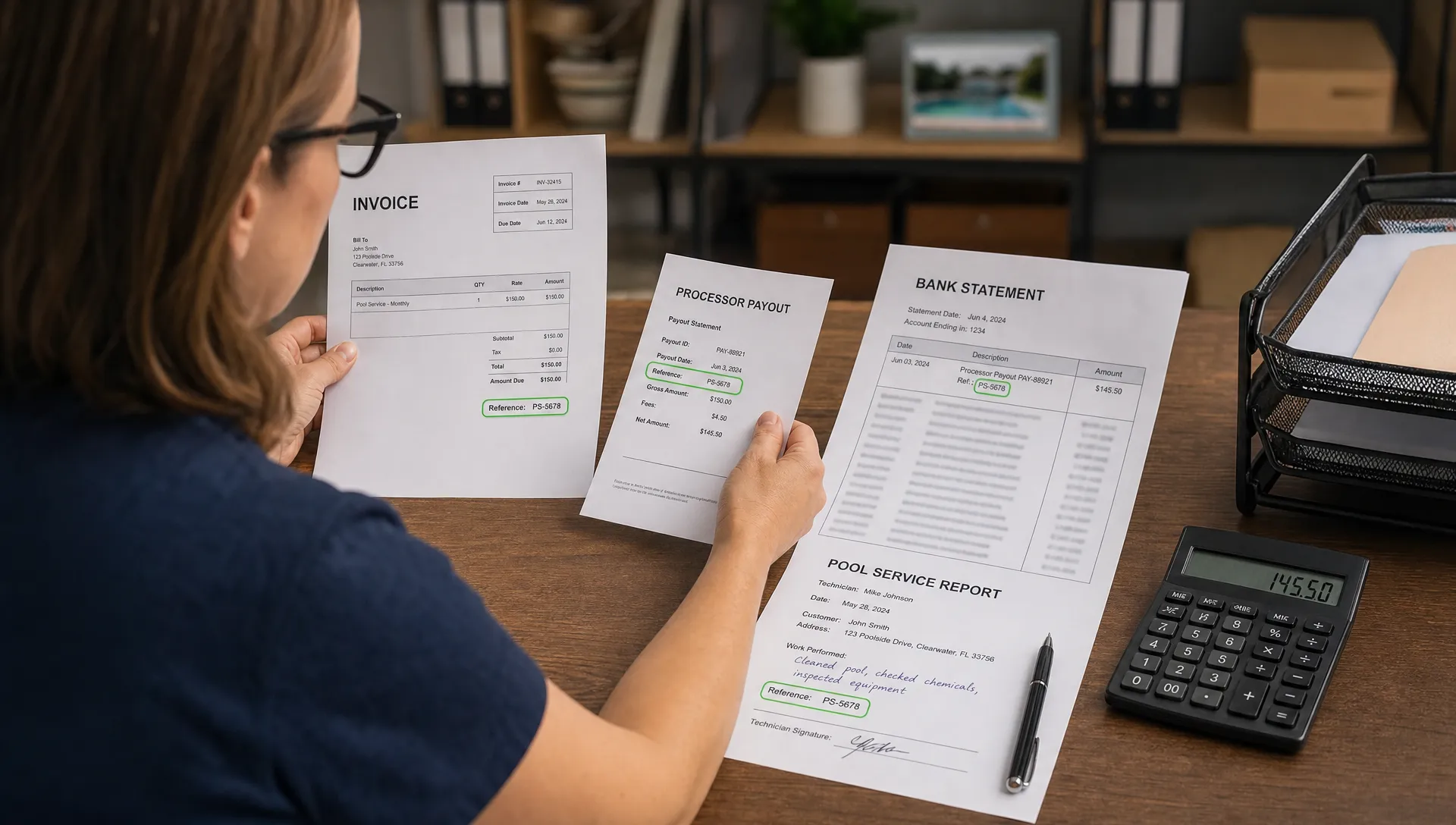
3. Match gross payments, fees and net deposits
A bank deposit is often a batch settlement, not a single customer payment. Comparing invoice totals directly with net deposits can create false exceptions.
Consider this illustrative example, with a hypothetical fee rather than a quoted processor rate:
| Activity | Amount | Treatment |
|---|---|---|
| Monthly maintenance invoice paid successfully | $200 | Apply the payment to that invoice |
| Separate repair invoice with a failed payment attempt | $350 | Leave the repair invoice open |
| Processing fee deducted from the successful payment | $6 | Record the fee separately |
| Net bank deposit | $194 | Match to the processor payout |
Here, $200 collected minus the $6 fee equals the $194 deposit. The failed $350 attempt does not belong in the payout calculation, and the business still has a $350 receivable.
Use the accounting CRM records to connect the customer balances to that settlement evidence, rather than reducing invoice revenue to match the bank deposit.
For more complex payouts, reconcile gross collections less refunds, fees, returns, disputes and reserves, plus or minus other documented adjustments. Include only items that actually affect that payout. A return deducted from tomorrow’s settlement should not be forced into today’s deposit.
4. Recover the balance without creating duplicate charges
Once failure is confirmed and the balance is accurate, contact the homeowner with a specific next step.
A useful message identifies the service, property, invoice number and amount due without exposing sensitive payment details. For example:
We couldn’t complete the $240 payment for October pool maintenance at your Oak Street property. Invoice 1048 remains unpaid. Please use your secure payment link to update your payment method or contact our office to arrange payment. If you have already paid another way, let us know so we can check before another attempt.
Adjust that wording for returned payments or disputes. Do not send a “card declined” message when the actual issue is an unresolved bank transfer.
An accounting CRM workflow should make the collection history visible before anyone retries a payment. Follow your processor’s decline guidance, retry rules and authorization requirements. Some failures may justify a later retry; others require updated payment details or new authorization.
For a disputed charge, use the processor’s dispute process rather than attempting another charge for the same contested amount. Preserve service dates, approvals, invoices and relevant communications, but do not assume those records guarantee a favorable outcome.
5. Close the exception only when the records agree
A homeowner’s promise to pay is a follow-up item, not a completed reconciliation. Likewise, an email saying “payment submitted” is not proof that funds settled.
Close the exception when the invoice balance is correct, the payment status is supported by processor evidence and the accounting treatment is documented. Match the associated bank activity when it becomes available. If settlement is still pending, retain that outstanding reconciliation task even if customer outreach is complete.
A practical closeout record includes:
- The original failure or return reference and final resolution.
- Any replacement payment ID and its invoice allocation.
- Fees, adjustments and the related payout or bank transaction.
- The owner, completion date and any remaining follow-up.
Your accounting CRM history should let another employee reconstruct the resolution without searching someone’s personal inbox.
For recurring service, also verify the next scheduled payment arrangement. Recovering this month’s balance does not necessarily fix an expired card or invalid authorization for next month.
Make exception handling reliable as your pool route grows
More customers mean more opportunities for similar names, duplicate attempts and missed follow-ups. Scaling the process requires clear ownership before it requires more automation.
Assign an office owner to review new failures each business day. Have the bookkeeper reconcile payouts and ledger adjustments, with a second review for manual write-offs or unusual refunds. Technicians should receive only the operational information they need, not sensitive financial details.
Use your service agreement to guide overdue-account decisions. Do not let a payment-status label silently cancel scheduled maintenance. Communicate any service change clearly and consider property access, equipment concerns and applicable contractual requirements.
Our article on why contractors need CRM and accounting in one workflow provides related context for contractors using CRM processes to support business growth. For this specific process, the scaling benefit is a repeatable handoff: one person investigates, another verifies the accounting and the next employee can see what happened.
For peer perspectives, Reddit’s small-business discussions about contractor CRM software are a place to look for implementation experiences and ask about payment handoffs. Treat individual posts as anecdotes, not accounting guidance or proof of a product’s capabilities.
Measure your accounting CRM process by unresolved dollars, exception age, repeat failures and duplicate-charge incidents. Those measures reveal problems that a simple “invoices paid” total can hide.
Frequently asked questions
Should I delete an invoice when the payment fails? No, not if the invoice represents a valid charge. Keep it open or restore its unpaid balance by correcting the payment entry. Canceling an invoice is appropriate only when the underlying charge itself should be canceled, using your accounting policy.
Can I charge the homeowner again immediately? First confirm the original attempt failed and that no alternative payment succeeded. Then follow the processor’s retry guidance and applicable authorization requirements. Do not retry unresolved payments or blindly resubmit transactions requiring corrected payment details.
Why does the bank deposit differ from the paid invoice total? Deposits may combine multiple payments and include deductions or adjustments. Match the processor’s payout detail to the bank, then connect each payment to its invoice. A lower deposit does not automatically mean a customer owes the difference.
Does an accounting CRM replace bookkeeping software? Not necessarily. The phrase can describe a connected customer, billing and accounting workflow. Verify where the general ledger, reconciliation and financial reporting actually live rather than assuming a CRM includes those functions.
Should a failed payment be written off? Not automatically. Failure means collection did not complete, not that the balance is uncollectible. Follow your documented collection and write-off policy, with appropriate accounting review.
Connect payment follow-up with the service record
SplashIQ supports customer CRM, service scheduling, homeowner communication, online payments and field documentation, including water-quality logs and before-and-after photos. Those records provide useful context when the office needs to explain a charge or confirm completed work.
Keep accounting reconciliation requirements separate from assumptions about native features. Before adopting any workflow, verify how payment statuses, transaction references and accounting records will be exchanged and reviewed.
Explore SplashIQ’s pool service platform to assess how its customer, field and payment workflows fit your operation, then map the failed-payment handoff with your bookkeeper.