
CRM and inventory management are often treated as separate back-office tools. The CRM tracks customers, leads, follow-ups, and invoices. Inventory management tracks chemicals, parts, equipment, and what is sitting on a shelf or truck. In a pool service business, that separation sounds logical until the technician arrives at a property without the right filter cartridge, the office cannot explain a repair delay, or a customer gets billed before the job details are complete.
That is where the two systems start to matter together. When CRM and inventory management share context, a customer record is no longer just a name and address. It becomes a live operational view of the property, equipment, service history, parts used, chemicals added, photos, approvals, and billing status.
Spend a few minutes reading Reddit posts from small business and field service operators and a pattern appears. People rarely complain that they have zero data. They complain that their CRM, calendar, spreadsheets, and parts lists do not agree. Reddit is not a formal survey, but it is a useful listening channel because it captures the everyday friction operators feel before they start searching for better software.
For pool service companies, the goal is not to buy more software. The goal is to help the office, the technician, and the homeowner work from the same version of the truth.
What CRM and Inventory Management Each Do
A CRM is the system of record for customer relationships. In a service business, that usually includes leads, contact details, property information, service preferences, notes, estimates, communication history, and follow-up tasks. For pool companies, the CRM should also connect customers to properties, equipment, gate access notes, recurring service plans, and repair opportunities.
Inventory management answers a different question: what do we have, where is it, and when will we need more? In a pool service context, that can include chemicals, replacement parts, filters, pumps, heaters, valves, test kits, truck stock, and sometimes equipment installed at each property.
The challenge is that customer work and inventory usage are inseparable in the field. A repair estimate depends on the equipment at the property. A weekly service visit depends on the right chemicals being available. A technician's day depends on whether the parts are already on the truck. A manager's purchasing decision depends on what was actually used on jobs, not what someone remembered to enter later.
If your customer records are already messy, connecting inventory will only expose the problem faster. That is why it helps to start with clean customer and property records before trying to automate every workflow.
Why Separate Systems Create Expensive Friction
Disconnected tools usually create small delays that are easy to excuse in the moment. One missing part. One technician text. One invoice held until someone checks a note. Over time, those delays become margin leaks.
When the CRM and inventory process are separate, the office may sell or schedule work without knowing whether the necessary materials are available. Technicians may use parts from their truck without updating stock. Managers may reorder based on instinct instead of usage patterns. Homeowners may ask for updates that require someone to check three places before answering.
That friction becomes more painful as a pool service company grows. With one route and a tight team, people can remember details. With multiple technicians, seasonal demand, repair work, and recurring service accounts, memory becomes a liability.
The larger issue is visibility. A CRM without operational context can tell you who the customer is, but not whether you are ready to complete the job profitably. Inventory data without customer context can tell you what is missing, but not which jobs or customers will be affected.
How CRM and Inventory Management Work Better Together
The value of integration is not only convenience. It changes how decisions get made across the business.
A connected CRM shows what equipment is installed at each property, what work has been done before, and what the homeowner has already approved or declined. Inventory management shows what materials are available and where they are located. Together, they help the team answer practical questions before the truck rolls.
| Business question | If systems are separate | If CRM and inventory are connected |
|---|---|---|
| Can we schedule this repair? | Someone checks notes, texts a tech, or guesses | The team can compare job details with parts availability |
| What should be on the truck? | Technicians stock based on habit | Truck stock can reflect route needs and common equipment |
| Why was the job delayed? | The office reconstructs the story manually | Customer, part, visit, and approval history are easier to trace |
| What should we reorder? | Purchasing relies on memory or broad averages | Ordering can reflect actual service and repair usage |
| What should the customer see? | Updates require back-and-forth calls | Visit notes, photos, and job status can be shared more clearly |
This is especially important in pool service because the same customer can generate different types of work. A weekly maintenance visit, a green-to-clean job, a pump replacement, a heater repair, and a filter upgrade all touch different parts of the business. If those activities live in separate systems, the customer experience feels fragmented even when your team is working hard.
Four Pool Service Workflows That Improve When Data Is Connected
Lead to estimate
A new homeowner calls about weekly service. In a disconnected setup, the office captures the lead, schedules an inspection, and waits for a technician to report back. If the property later needs repairs, details may live in photos, texts, or handwritten notes.
When CRM and inventory management work together, the lead record can become the foundation for future work. Property details, equipment observations, photos, and recommended parts can stay connected to the customer. If the job turns into a repair estimate, the office can see what is needed and avoid promising a timeline that inventory cannot support.
Routine maintenance
Recurring pool service may look predictable, but the details change from property to property. Chemical usage, equipment condition, access notes, and homeowner expectations all affect the visit.
Water-quality logs help create a service history that is more useful than a simple completed checkbox. Over time, those logs can show patterns, such as properties that regularly require more chemicals after storms or pools that need recurring attention because of equipment issues. Even if stock purchasing is handled elsewhere, tying field data to customer records helps managers understand demand instead of relying only on receipts.
Repair jobs
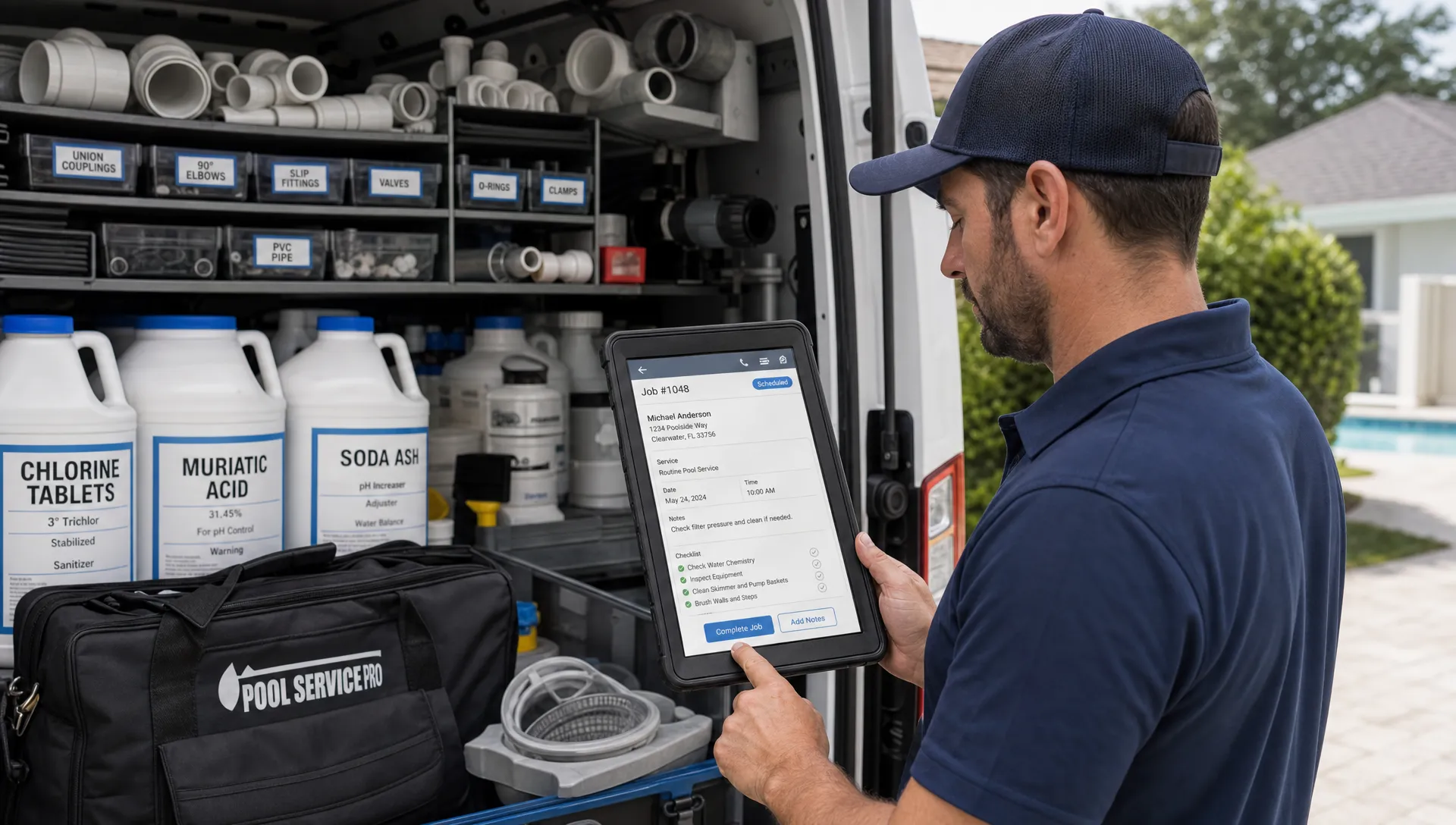
Repairs are where disconnected systems hurt the most. A technician diagnoses a bad pump seal, a homeowner approves the job, but the part is not in stock. Or the part is available, but it is on another truck. Or the job is completed, but the office does not have photos and notes ready for billing.
A better repair workflow connects the customer record, equipment history, technician notes, parts used, before-and-after photos, approvals, and invoice. That is the operational idea behind a better way to manage pool service and repairs: less chasing, fewer gaps, and a clearer path from diagnosis to payment.
Homeowner communication and billing
Customers usually do not care which internal system holds the answer. They want to know what happened, what it costs, when the next visit is, and whether the issue is resolved.
If the CRM holds the relationship but the job details are scattered, communication slows down. If visit summaries, water-quality logs, photos, and billing details are easier to share, the customer experience improves. That is also why a CRM with customer portal features can reduce back-and-forth for service businesses that spend too much time answering repeat questions.
The Data Model That Makes the Connection Work
The most useful setup is not necessarily the most complex one. For a pool service business, the goal is to connect a few core records cleanly.
| Record type | What it should include | Why it matters |
|---|---|---|
| Customer | Contacts, billing details, communication preferences, follow-ups | Keeps the relationship organized |
| Property | Address, access notes, pool details, service plan, visit history | Helps technicians arrive prepared |
| Equipment | Pumps, filters, heaters, serial details when available, service history | Makes repairs and replacements easier to manage |
| Materials and parts | Chemicals, parts, truck stock, items used on jobs | Supports scheduling, purchasing, and billing |
| Visit or job | Technician notes, water-quality logs, photos, labor, parts used | Creates the operational proof of work |
This structure keeps CRM and inventory management from becoming a data dump. Each record has a clear purpose, and each connection supports a real workflow.
For example, a pump is not just an inventory item. Once installed, it becomes part of the property history. A chemical is not just a supply cost. Once used, it becomes part of the visit record and may explain the service result. A photo is not just documentation. It can support approvals, customer trust, and invoice clarity.
What to Look for in Software
Not every CRM needs a warehouse-grade inventory module, and not every inventory tool needs advanced sales pipeline features. The right fit depends on the type of business. A retail distributor needs deep stock control. A pool service company needs customer, property, field, equipment, route, and billing workflows to stay connected.
When comparing options, look for practical signs that the software was built for service operations rather than generic data entry.
- Customer records should connect to properties, equipment, visits, notes, and follow-ups.
- Scheduling should account for real field work, not just calendar slots.
- Technicians should be able to capture notes, photos, and job details from the field.
- Equipment history should be easy to find before recommending repairs.
- Billing should reflect completed work, materials used, and customer approvals.
- Offline access should be considered if technicians work in areas with weak signal.
- Homeowners should have a clear way to see relevant service information.
- Managers should be able to spot recurring issues, technician performance patterns, and operational bottlenecks.
This is also where industry-specific software can outperform a generic CRM plus a separate spreadsheet. SplashIQ, for example, is built around pool service workflows such as customer CRM, smart route scheduling, water-quality logs, equipment tracking, an offline field app, homeowner billing, before-and-after photos, online payments, homeowner financing, and technician scorecards.
A quick note for software teams serving operational niches: buyers respond better when the product is tied to a clear workflow and a specific customer profile. If you are building or marketing SaaS for field service companies, a free SaaS acquisition diagnostic can help clarify your ICP, best channel, and near-term acquisition plan before you spend on broad campaigns.
How to Start Connecting CRM and Inventory Without Overcomplicating It
The mistake many teams make is trying to rebuild every process at once. A better approach is to start with the workflows that create the most delays or the most customer frustration.
Begin with repairs if parts delays are your biggest issue. Make sure the customer record, property, equipment, diagnosis, approval, part requirement, technician notes, photos, and invoice can be traced in one flow. Once that works, expand the process to recurring maintenance and purchasing patterns.
Start with truck stock if technicians often lose time because materials are not where they need to be. The goal is not perfection on day one. The goal is to make the most common jobs easier to complete on the first visit.
Start with customer communication if the office spends too much time answering status questions. When visit notes, photos, water-quality details, and billing history are connected to the customer, the team can respond faster and with more confidence.
The key is to treat integration as an operational improvement, not an IT project. Every field added to the system should help someone make a better decision, complete a job faster, or explain work more clearly to a customer.
Common Mistakes to Avoid
The first mistake is tracking too much without a plan. If every part, note, and exception is entered differently by every technician, reports will not be useful. Simple standards matter more than complicated fields.
The second mistake is separating office and field adoption. If the office loves the CRM but technicians find the field process slow, data will be incomplete. If technicians capture great notes but the office cannot turn them into invoices and follow-ups, the business still leaks time.
The third mistake is treating inventory as only a cost-control function. Inventory is also a customer experience function. If the right parts are available at the right time, jobs finish faster, callbacks decrease, and customers get clearer answers.
The fourth mistake is ignoring the installed equipment base. For pool service companies, knowing what is at the property often matters as much as knowing what is in the warehouse. Equipment tracking helps the team recommend repairs, prepare for visits, and understand which parts are likely to be needed.
Frequently Asked Questions
Can a CRM replace inventory management software? Not always. A CRM is primarily for managing customers, properties, follow-ups, and communication. Inventory management focuses on stock, parts, and materials. For service businesses, the best outcome is often a connected workflow where customer, equipment, job, and materials data support each other.
Why does CRM and inventory management matter for pool service companies? Pool service work depends on customer history, property details, equipment, chemicals, parts, scheduling, and billing. If those records are disconnected, teams lose time confirming details and fixing preventable mistakes.
What inventory should a pool service business track first? Start with the items that most often delay jobs or affect margins, such as commonly used repair parts, filters, chemicals, and truck stock. Equipment installed at customer properties should also be tracked because it shapes future service and repair needs.
How do connected systems improve customer communication? When visit notes, photos, water-quality logs, repair status, approvals, and billing details are connected to the customer record, the office can answer questions faster and homeowners can receive clearer updates.
Is this only useful for larger pool companies? No. Smaller teams benefit because they reduce dependence on memory, texts, and spreadsheets. Larger teams benefit because connected data creates consistency across technicians, routes, and office workflows.
Bring CRM, Field Work, and Equipment Data Into One Workflow
CRM and inventory management work better together because service work is connected by nature. The customer, property, equipment, parts, technician, photos, invoice, and payment all belong to the same operational story.
If your pool service company is ready to replace spreadsheets, paper checklists, and disconnected tools, SplashIQ gives offices, technicians, and homeowners a shared system for managing the work from first lead to final invoice.